



Desktop Explorer Review
Your antivirus software can’t protect you from these horrors…

As her uncle Hal transitions to a dementia care facility, Gwen is left grieving her surrogate father who is slowly slipping away, as she grapples with questions surrounding his decline. Before leaving home, he set aside an old computer from the 90s: a window into his unraveling mind and the mystery of what happened to a missing person who was once dear to him, so long as Gwen can crack it. In this debut game from Mexican development studio Recurring Dream, you’ll help Gwen investigate this machine and try to find the answers her uncle was seeking. The game offers up psychological horror and puzzles, drenched thick with nostalgia.
“Fake OS” or “interface games” offer unique opportunities for puzzle design and immersive investigative gameplay. Since most games in the genre are PC-only or PC-first titles and the aesthetic and systems mimic an operating system, the right combination of UI and features, plus a solid setup to the mystery, can make for a completely engrossing sleuthing experience. This is something that Desktop Explorer achieved very successfully, for the most part. Especially while sitting on the couch playing on my laptop (this game ran great on both my PC and MacBook), there were moments that I almost forgot I wasn’t pouring through an actual long lost laptop from the 90s.
Desktop Explorer in Action
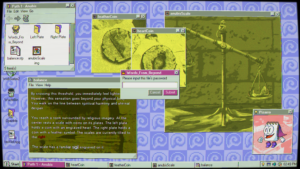
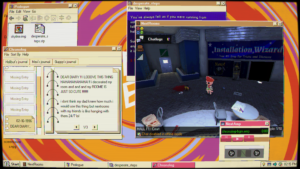
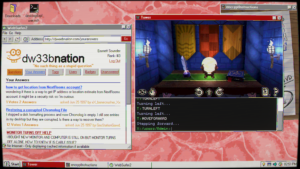
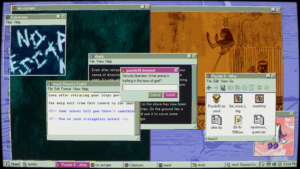
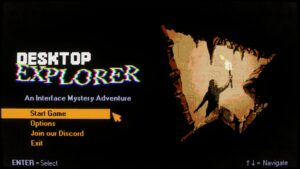
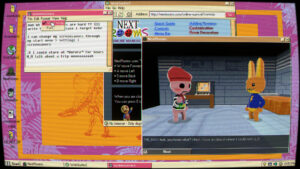
For players who might be hesitant to try an interface game because of a lack of familiarity with retro computers, Desktop Explorer eases players into the genre. The game is divided into several chapters, contained within different user logins. The only login you initially can access belongs to Gwen’s uncle Hal. On Hal’s side of the hard drive, you’ll come across an executable file also titled Desktop Explorer and, with it, Pizarro. Pizarro is the game’s analog for Microsoft’s Clippy, and it offers up helpful tooltips and the occasional unsettling remark. The in-game Desktop Explorer is a text adventure composed of folders within locked folders, most of which require a password. The story and clues are composed of text files, images and multimedia pages written with markdown.
This game-within-a-game sets up a clear boundary around what tools players will be expected to use, gradually introducing OS features like viewing hidden files in the file explorer, renaming files, and editing simple source code. It also confines the puzzle-solving to the files, folders, and narrative of the text adventure, rather than setting players loose to investigate an entire hard drive or fictitious world wide web for answers.
I think it’s a great introduction for players who are new to the genre, but I found myself getting antsy by the middle of this first chapter, wanting a more “real world” scenario to sink my teeth into. That said, the psychological horror vibes also do set in fairly quickly during this early part of the game, which kept me engaged and creeping further and further towards the edge of my seat. Although I got a little impatient, I discovered by the end of Hal’s chapter that I had learned more about these characters than I first thought. But more on that later.
Fake OS successes and foibles
There are plenty of other pitfalls to this genre, and Desktop Explorer handles most of them very well. The game carefully walks the tightrope between offering enough spaces and files and software tools to make the experience feel like a genuine investigation of a real person’s computer, while making sure not to overload the player or allow for so many different paths of inquiry that time gets wasted on red herrings and dead ends. Establishing a broken ethernet port early on turns out to be a great way to offer a somewhat realistic, but reasonably limited use of “online” content.
Recurring Dream explores the versions of ourselves that we leave behind in our digital footprints. What self portrait emerges when we look at the secrets and shame that we leave in the dark corners of our devices when we think no one is looking?
One pitfall of fake OS puzzle design that the game mostly avoids but occasionally falls into is the case when system tools or software features suddenly work in unexpected ways that don’t align with their real world uses. For example, compressing a file to solve a puzzle that requires a smaller file size checks out, but later needing to compress a file to change its contents verges into fantastical uses of the feature that require a little bit more of a logical setup. The few times I got stuck on a puzzle, it was usually due to an atypical, though admittedly creative, use of a tool.
Desktop Explorer Trailer
Operational anachronisms aside, Desktop Explorer manages to craft an immersive digital space filled with clever and increasingly sinister puzzles. But even more importantly, it’s filled with artifacts from users past, that wind together to reveal the truth about what happened to Hal’s missing person. Through archived chat logs, digital journal entries, and the odd cached webpage, Recurring Dream explores the versions of ourselves that we leave behind in our digital footprints. What self portrait emerges when we look at the secrets and shame that we leave in the dark corners of our devices when we think no one is looking? As one character puts it, “think of it as a mirror. The computer doesn’t know you, it is a reflection of you.”
Told in a Y2K setting, the questions Desktop Explorer asks us to consider are particularly relevant in 2026, during this height of AI chatbots and algorithms designed to build entire psychological and biographic profiles of us, based on our digital behavior. I was impressed by how much the game made me feel for (and fear for) these characters, with relatively few lines of dialogue. Like most truly powerful horror stories, Desktop Explorer understands that often we are our own deepest fears.
Get to the point, girl
Emily’s Score: 8/10
Emily was provided with a review key of Desktop Explorer by popagenda
About No Small Games
No Small Games is an indie game recap and review podcast brought to you by hosts Kate and Emily! They became friends while streaming on Twitch and bonded over their love of indie video games. In each episode of No Small Games, the two will discuss an indie game they both played independently. They’ll compare their experiences: the good, the bad, their most memorable moments of their playthroughs.
Learn more about the podcast and its hosts on the About page.